Email notifications are one of those integrations that usually remain invisible until they stop working. An application generates an alert. A notification service attempts to send an email. A message should reach its destination. Simple—until it doesn’t. When email notifications suddenly fail in a cloud-hosted platform, the first instinct is often to investigate the application: check the notification settings, verify the SMTP server, review credentials, or look for recent configuration changes.
Email notifications are one of those integrations that usually remain invisible until they stop working.
An application generates an alert. A notification service attempts to send an email. A message should reach its destination.
Simple—until it doesn’t.
When email notifications suddenly fail in a cloud-hosted platform, the first instinct is often to investigate the application: check the notification settings, verify the SMTP server, review credentials, or look for recent configuration changes.
But what if all of those settings are correct?
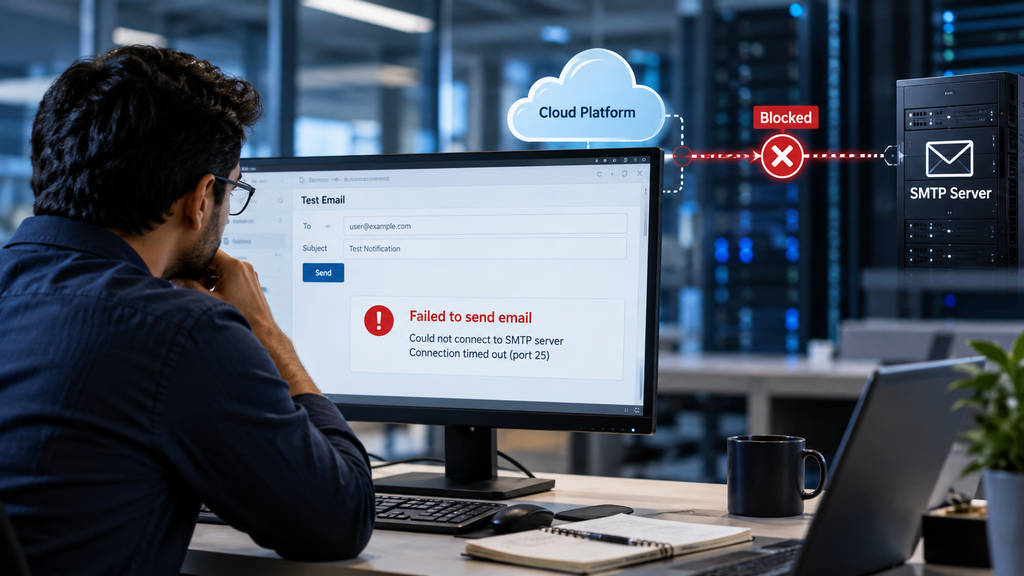
Sometimes the application is doing exactly what it was designed to do. The failure occurs because the surrounding cloud environment is preventing the application from establishing the connection it needs.
That distinction can completely change the direction of an investigation.
When Everything Looks Correct
One of the most challenging troubleshooting scenarios is a failure where the application configuration appears perfectly valid.
The notification destination exists.
The mail server address is correct.
The application is generating the notification.
There are no obvious configuration errors.
Yet the email never arrives.
This type of problem can lead administrators into a long cycle of checking application settings, recreating notification rules, testing credentials, and reviewing mailboxes.
But an important question is often overlooked:
Did the application ever successfully reach the mail server?
If the answer is no, changing application settings may not solve anything.
In one real-world scenario involving a cloud-hosted platform, email notifications were expected to use an existing SMTP relay. The configuration appeared consistent with the organization’s previous environment, but messages were not being delivered.
The investigation eventually moved away from the application and toward the network path.
That was where the real problem became visible.
The Legacy SMTP Assumption
For many years, enterprise applications commonly relied on traditional SMTP communication.
A typical architecture looked something like this:
Application → SMTP Relay → Mail Infrastructure → Recipient
TCP port 25 was frequently used for SMTP communication, particularly when applications were sending mail through an organization’s internal relay.
This model worked well in traditional data center environments because administrators generally had direct control over:
- Network routing
- Firewalls
- Outbound traffic
- Internal mail relays
- Server-to-server communication
Over time, however, many organizations moved these applications to cloud-hosted platforms.
The architecture changed.
The old SMTP configuration often did not.
And that created a hidden dependency.
Cloud Changes the Network Model
Moving an application to the cloud is not simply a matter of moving the application itself.
The surrounding network model may change significantly.
In an on-premises environment, an administrator might be able to configure a firewall rule allowing a server to communicate with an SMTP relay.
In a SaaS or tightly controlled cloud environment, that level of network control may not exist.
Outbound connectivity can be governed by platform-level security policies, approved destinations, restricted ports, or provider-specific networking controls.
This means an application can have a perfectly valid SMTP configuration and still be unable to establish the required connection.
The application may be attempting to connect.
The cloud environment may simply be saying:
“That connection is not permitted.”
This is where troubleshooting needs to move beyond application configuration.
Why SMTP Port Restrictions Matter
SMTP has long been associated with TCP port 25.
However, unrestricted outbound SMTP traffic presents security and abuse risks. Port 25 is commonly associated with direct mail transfer and has historically been abused for spam and malicious activity.
For this reason, many cloud environments place restrictions on outbound SMTP traffic.
The exact behavior varies by cloud provider, platform, architecture, and service.
The important point is this:
A network connection that was available to an on-premises server may not automatically be available to a cloud-hosted application.
That difference can be easy to miss during a migration.
The application may still contain the same SMTP server name.
The same port may still be configured.
The same notification settings may still exist.
But the network path underneath the application has changed.
The Difference Between Application Failure and Connectivity Failure
This distinction is one of the most useful concepts when troubleshooting cloud-based integrations.
Consider two scenarios.
Scenario 1: Application Configuration Failure
The application attempts to send an email, but the SMTP configuration contains an incorrect hostname or authentication setting.
The application can reach the SMTP service, but the SMTP transaction fails.
This is an application or messaging configuration problem.
Scenario 2: Network Connectivity Failure
The application attempts to connect to the SMTP service, but the connection is blocked before the SMTP session can be established.
In this situation, changing notification settings may accomplish nothing.
The problem exists lower in the communication stack.
A useful troubleshooting model is therefore:
Application → DNS → Network Path → Firewall / Egress Policy → SMTP Service → Authentication → Message Delivery
The failure can occur at any one of these layers.
That is why simply checking the application’s configuration is not always enough.
The Hidden Layer: Cloud Egress Controls
One of the most important concepts in modern cloud architecture is egress control.
Egress refers to traffic leaving an environment.
For example:
Cloud Application → Internet / External Service
Organizations may control this outbound traffic using firewall policies, network security controls, allowlists, proxies, service endpoints, or platform-specific restrictions.
These controls exist for good reasons.
They can help organizations achieve:
- Reduced attack surface
- Better control over external communication
- Improved visibility into outbound traffic
- Stronger data-loss prevention
- Better compliance
- Protection against unauthorized external connections
But these same controls can expose hidden dependencies during application migrations.
An application that previously communicated freely with an internal SMTP relay may suddenly find that the same communication path is unavailable after moving to a cloud platform.
Modern SMTP Design Is About More Than a Port
Another important lesson is that SMTP should not be treated simply as:
“Server + Port + Password.”
Modern email integrations need to consider security and authentication requirements as part of the architecture.
Depending on the platform and mail service, modern designs may involve:
- TLS encryption
- Authenticated SMTP submission
- Secure relay services
- Application-specific authentication mechanisms
- API-based email delivery
- Network allowlisting
- Dedicated email delivery platforms
The right approach depends on the application, cloud platform, organization’s security requirements, and mail service.
The goal should not simply be to make port 25 work again.
The better question is:
What is the supported and secure way for this application to send email from its current architecture?
That question leads to a much more sustainable solution.
Troubleshooting From the Outside In
When an email integration fails in a cloud environment, a structured troubleshooting approach can save significant time.
Instead of immediately changing application settings, work through the communication path.
1. Confirm the Application Is Generating the Notification
First determine whether the application is actually attempting to send the message.
Check:
- Application logs
- Notification history
- Job execution status
- Event logs
- Error messages
If the notification is never generated, the issue may genuinely be inside the application.
If the notification is generated successfully, continue down the stack.
2. Verify the SMTP Destination
Confirm:
- SMTP hostname
- Port
- Encryption requirements
- Authentication method
- Relay configuration
Do not assume that a configuration that worked historically is still supported in the new environment.
3. Validate Network Connectivity
The next question is critical:
Can the application environment establish a connection to the SMTP destination?
Look for evidence of:
- DNS resolution problems
- Connection timeouts
- Firewall blocks
- Egress restrictions
- Routing issues
- Proxy requirements
- Platform-specific SMTP limitations
4. Check Cloud Security Policies
Review the controls governing outbound communication.
Depending on the architecture, this could include:
- Cloud firewall policies
- Network security groups
- Egress rules
- Secure web gateways
- Proxy configuration
- Destination allowlists
- Provider-level restrictions
5. Validate the Mail Service
Only after network connectivity is confirmed should you spend significant time investigating the mail service itself.
Check:
- Authentication failures
- Relay permissions
- TLS negotiation
- Sender restrictions
- Recipient restrictions
- Mail-service logs
This approach helps isolate the actual failure domain instead of repeatedly changing settings that were never responsible for the problem.
The Organizational Dependency
Another interesting aspect of these incidents is that the solution often crosses team boundaries.
The application team may own the notification configuration.
The network team may control outbound connectivity.
The security team may define egress policies.
The messaging team may manage the SMTP infrastructure.
The cloud team may control the platform architecture.
No single team necessarily has the complete picture.
This is increasingly common in modern enterprise environments.
Applications no longer operate in isolation. They depend on networks, identity systems, security controls, cloud services, APIs, messaging platforms, and third-party infrastructure.
As a result, troubleshooting also needs to become cross-functional.
What Cloud Migrations Can Reveal
Cloud migrations often expose dependencies that were invisible in traditional environments.
Before migration, an application may have relied on:
Application → Internal Network → SMTP Relay
After migration, the architecture might become:
Cloud Application → Controlled Egress → External SMTP Service
Those two architectures may look similar from an application configuration perspective.
They are very different from a networking and security perspective.
This is why migration planning should include dependency mapping.
Before moving an application, identify:
- External services it communicates with
- Required ports and protocols
- DNS dependencies
- Authentication requirements
- SMTP dependencies
- API dependencies
- Firewall requirements
- Egress requirements
- Third-party integrations
- Security policies affecting outbound traffic
The goal is to discover these dependencies before the migration rather than during an incident.
A Better Troubleshooting Mindset
The biggest lesson from this type of incident isn’t really about SMTP.
It’s about where we look for failure.
When an application behaves unexpectedly, it is natural to investigate the application first.
But modern cloud architectures introduce multiple layers between the application and the service it is trying to reach.
A useful troubleshooting question is:
Is the application failing, or is the environment preventing the application from succeeding?
That question forces us to look beyond application settings.
It encourages us to examine the complete path:
Application → Network → Security Controls → External Service
And that broader perspective can dramatically reduce troubleshooting time.
What This Means for Cloud Architects and Administrators
There is an important architectural lesson here.
When migrating workloads to the cloud, don’t simply reproduce the old configuration in the new environment.
Instead, validate whether the old design still makes sense.
A legacy SMTP relay may have been appropriate for an on-premises application.
A cloud-hosted application may be better served by a secure SMTP submission service, an approved relay, or an email API.
Likewise, an unrestricted outbound network path may have been acceptable in an older architecture but inappropriate under a modern zero-trust or least-privilege security model.
Cloud migration is therefore not just a hosting change.
It can require an architectural rethink.
Final Thoughts
Email failures are often deceptively simple.
A missing notification can look like an application problem, a credential problem, or a mail-server problem.
Sometimes, however, the application is working exactly as expected.
The real issue is the environment around it.
Cloud platforms introduce security controls and networking models that can prevent legacy communication patterns from working as they did in traditional data centers.
The solution isn’t always to modify the application.
Sometimes the right solution is to understand the new network architecture, identify the blocked dependency, and redesign the integration using a supported and secure communication model.
The broader lesson is simple:
Don’t troubleshoot only the application. Troubleshoot the path the application depends on.
When something stops working after a cloud migration, ask not only:
“What changed in the application?”
but also:
“What changed around the application?”
That second question is often where the real answer begins.
Key Takeaway
A failed cloud integration is not necessarily an application failure. When email notifications stop working, verify the complete communication path—including DNS, routing, egress controls, firewall policies, SMTP connectivity, authentication, and mail-service requirements—before changing application configuration.
Modern cloud troubleshooting requires understanding not just what the application is configured to do, but whether the environment allows it to do it.